
Pompom is a LEAP-powered Markdown notebook.
It remembers what matters, learns from your experiences, and connects what you know, helping you think, learn, and make better decisions.


A sample notebook: 1,494 notes in English and Chinese, mapped into 23 topics Pompom named itself.
What Pompom helps you do
A notebook that grows with you

Build a living memory
Capture your ideas, experiences, and meaningful moments in a notebook that remembers what matters, connects what you know, and grows with you.

Learn from experience
Turn everyday activities, successes, and mistakes into lasting knowledge.
Connect the dots
Discover relationships between ideas, experiences, and information you might otherwise miss.

Think and decide better
Draw on what you've learned to gain insights, solve problems, and make informed decisions.

Grow together with AI
Give AI agents the ability to remember, learn from experience, and continuously improve, so you and your AI can build on what you've learned together.
1Build a living memory
Write today, find it forever

Today: the day's note, its tasks, what links here, what mentions it, the notes around it and its history.
- Today is where you writeNow
Each day has its note. Write without deciding where anything belongs. Links, tags, quotes, English and Chinese, and tasks with a time that remind you, all live right in your words.
- Plain files, with their whole historyNow
Every note is a Markdown file in a folder you choose. Every version is kept, so nothing you wrote is ever lost.
- Capture from anywhereComing
Clip a web page, keep a screenshot, share from your phone, drop a PDF. Each arrives titled, tagged and summarised, and waits for your yes.
- Filed for you, by referenceComing
Pompom offers to show what you wrote today in the notes it belongs to, without cutting it out of the day it happened.
2Learn from experience
Learning you can inspect
LEAP is the learning layer beneath Pompom. From what you write, decide and ask, it proposes what you might have learned. Nothing becomes knowledge until you say so.
- Beliefs as notesComing
What you have learned is kept as ordinary notes: the claim, how sure you are, where it applies, and the evidence behind it.
- Always with the whyComing
Every belief keeps the passages that support or contradict it, and the record of how and why it changed.
- Your view, over timeComing
Ask how your view of something has changed, and see the moments that changed it.
- Forget on requestComing
Stop learning from a source, or erase it everywhere, after seeing what depends on it.
Warming up the KL term keeps the latent from collapsing.
Supports: "After the 20k-step warm-up, reconstructions stayed sharp." 想不通 latent 为什么塌
Supports: "Free bits off: collapse within 3k steps." 失败的 run 记录
A design sketch of a belief. LEAP's screens are still being drawn.
3Connect the dots
Everything you know, at a glance
A researcher's notebook: robot learning, a half-marathon plan, film photography, Sichuan cooking, Sunday calls home. Pompom found each topic and named it, with no folders or tags needed.
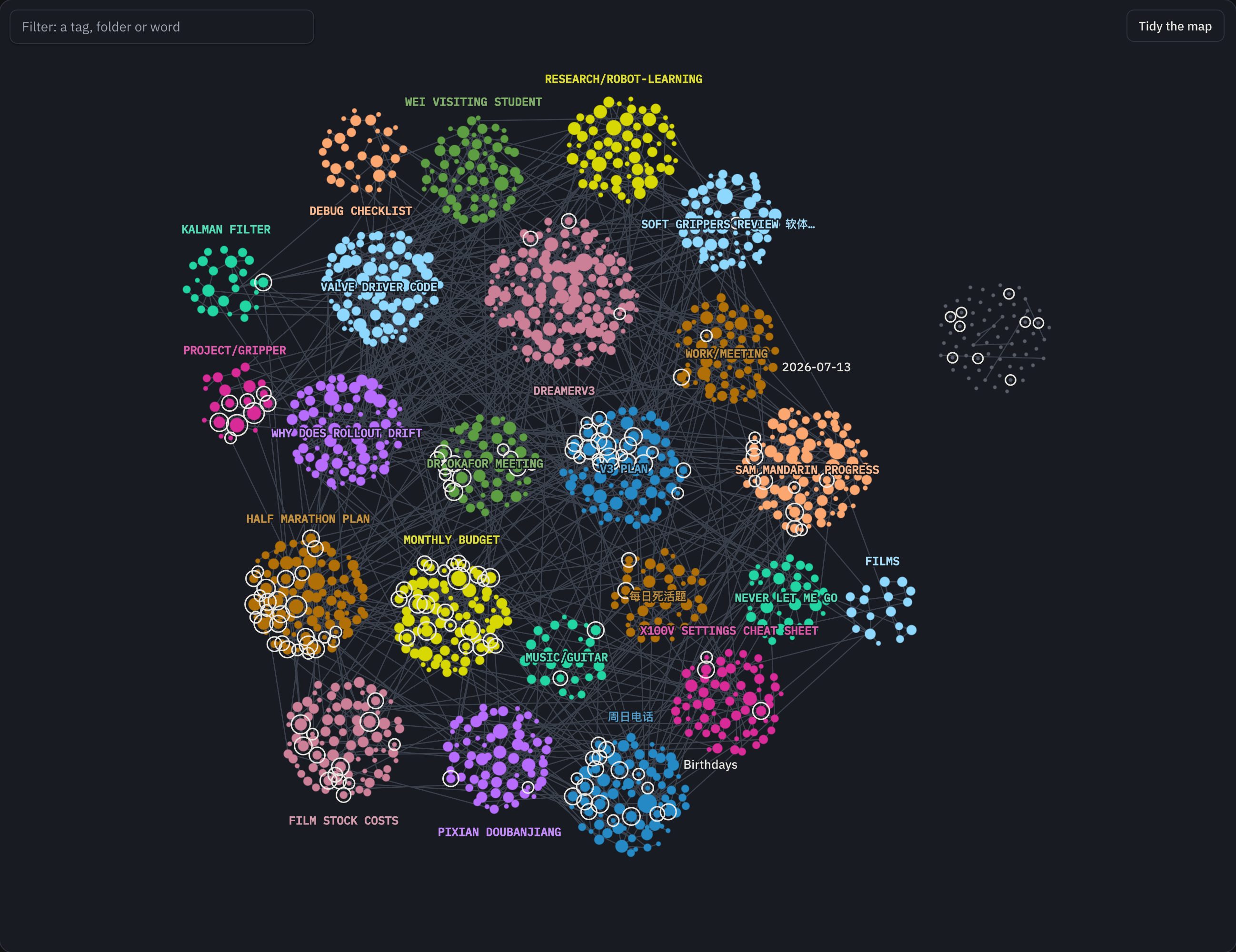
A map that answers questions
Most graphs are a pretty tangle. Pompom's map tells you something: which topics you write about, which ones never touch, and the notes that tie them together.
“DreamerV3 and Half marathon plan never meet: no link joins them.”What this shows, beside the map

Topics, named for you Now
Notes grouped by what they are about, each group named in whichever language you wrote it.
Ways in Now
Notes standing alone, ones you have not touched lately, the most connected, where topics meet, what has grown this month.
The map through time Coming
Slide back through the months and watch your topics appear, grow and join.

Every note, in its neighbourhood
- Set like a well-made pageNow
English, Chinese, or both in one sentence, maths, code and diagrams, all read beautifully.
- Links both waysNow
Beside every note: what links here, what mentions it without a link, and a small map of what is around it.
- Related notes, suggestedComing
Pompom notices notes about the same thing and offers the link, in blue and dashed, until you accept it.
4Think and decide better
Ask your own notes
- Answers that cite youNow
Ask in plain words. The answer is drawn from your notes and points to each passage it used.
- Search as fast as you typeNow
Results with every keystroke, in English and Chinese, forgiving of typos.
- Keep what you learnComing
Save an answer as a note, or turn it into a timeline of how a question unfolded.
- Contents that knows the noteComing
Long notes get a contents column that folds, filters and picks up where you left off.
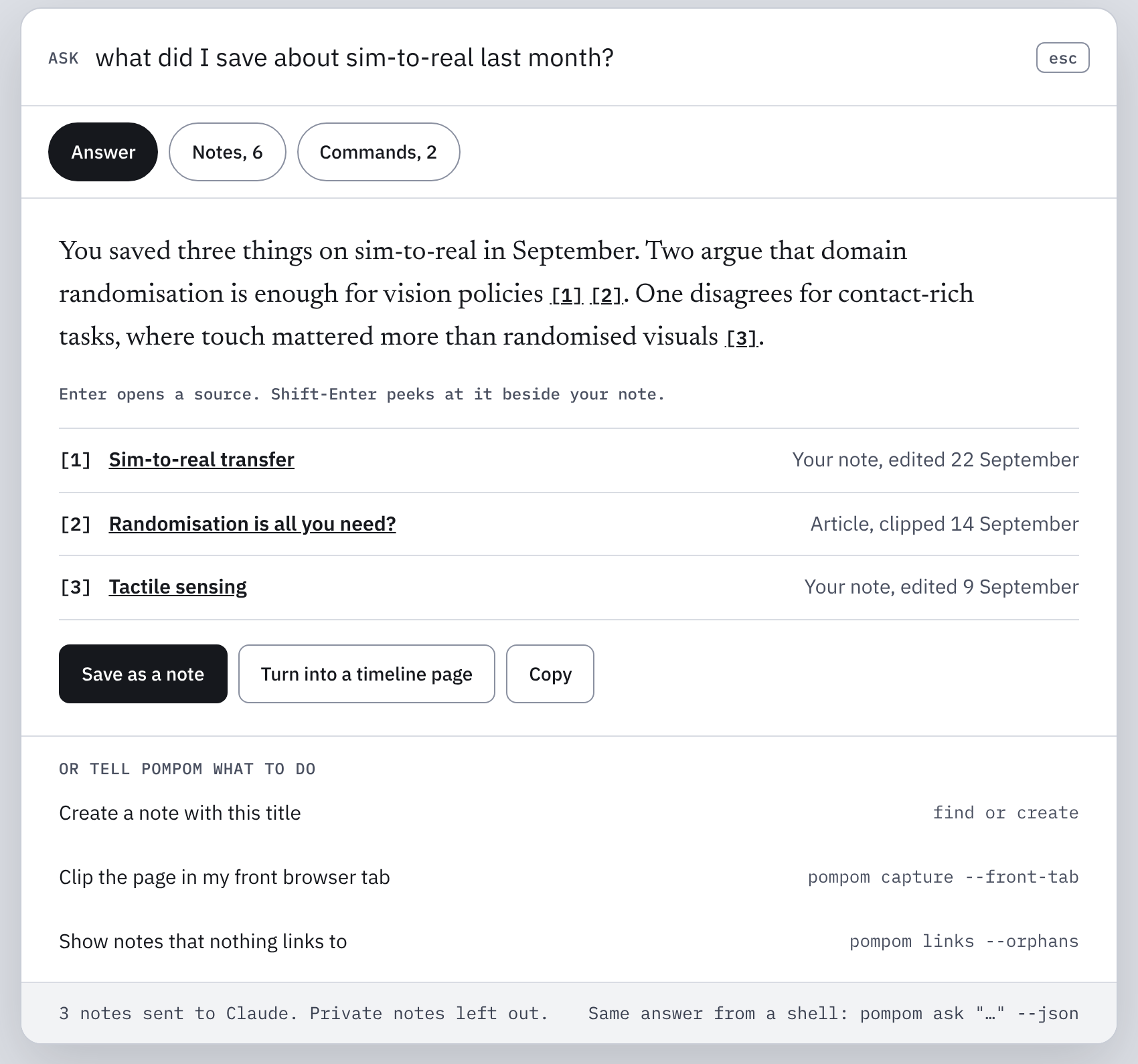
Design for Ask: the answer with its sources, and what is coming next.
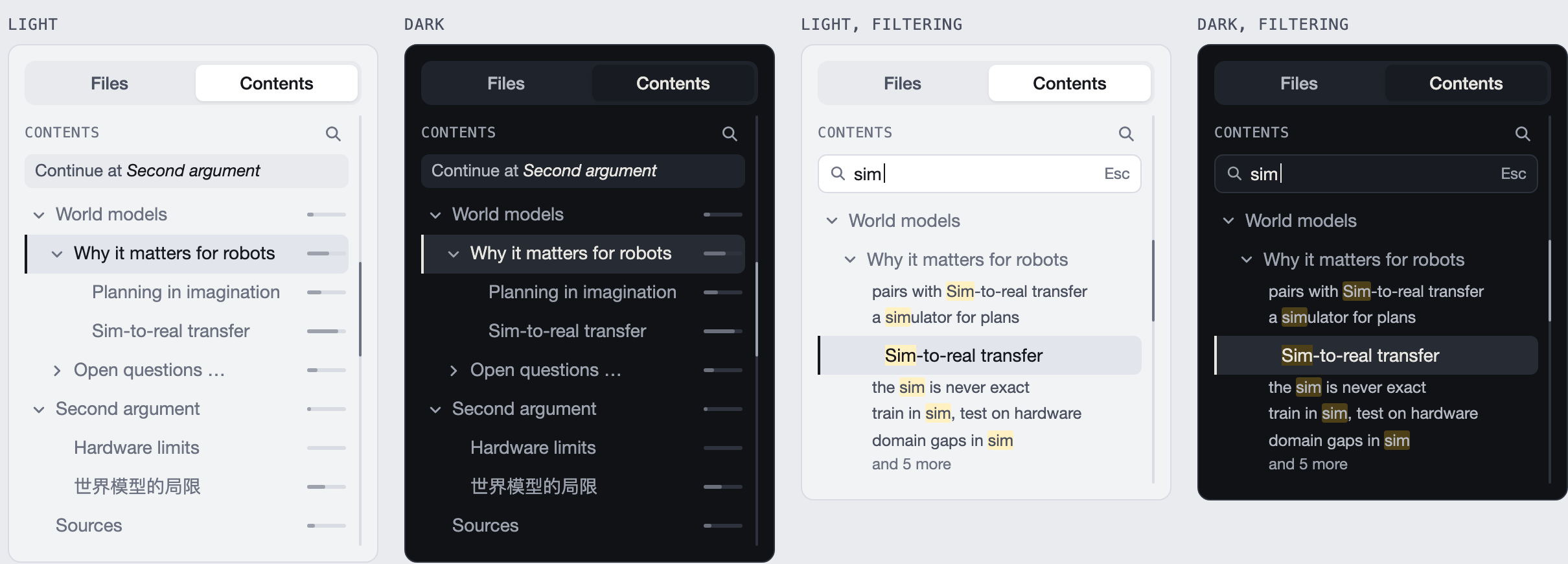
Design for the Contents column, light and dark, with its filter.
5Grow together with AI
AI that works beside you, in the open
- Agents propose, you decideNow
An agent may add its own notes, always signed and undoable in one click. Changes to your words wait in a review queue as a diff.
- Bring your own AINow
Claude Code or any tool that speaks MCP can join as a guest, with the access you grant, and never your private notes unless you say so.
- Your Guidelines, in a noteNow
Tell every agent how to work in one plain note they all read before they start.
- Agents that learn and growComing
A small team, each with a role, earning trust from your decisions and remembering what worked, through LEAP.
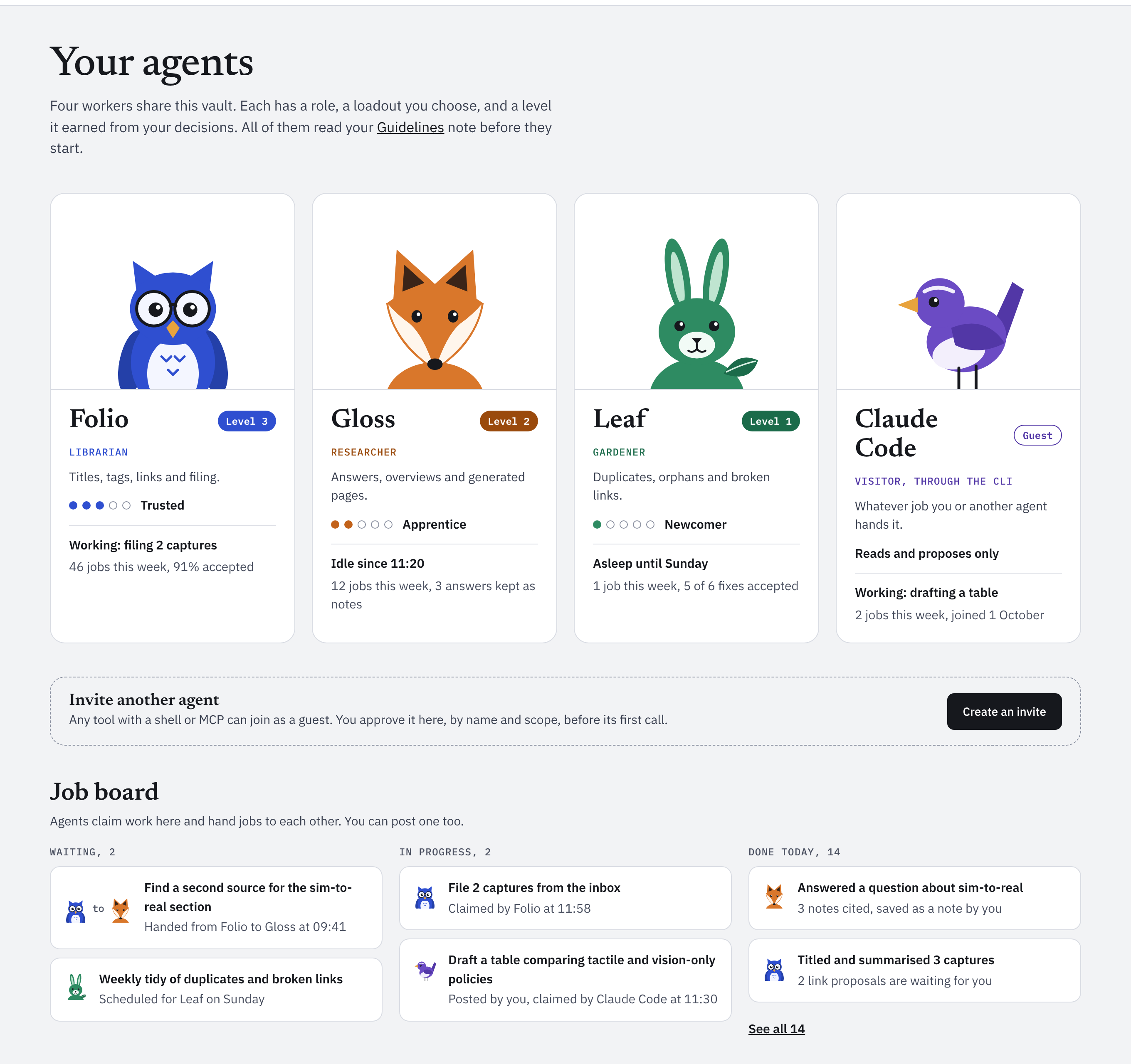
Design for your agents, their roles and the work they hand each other.
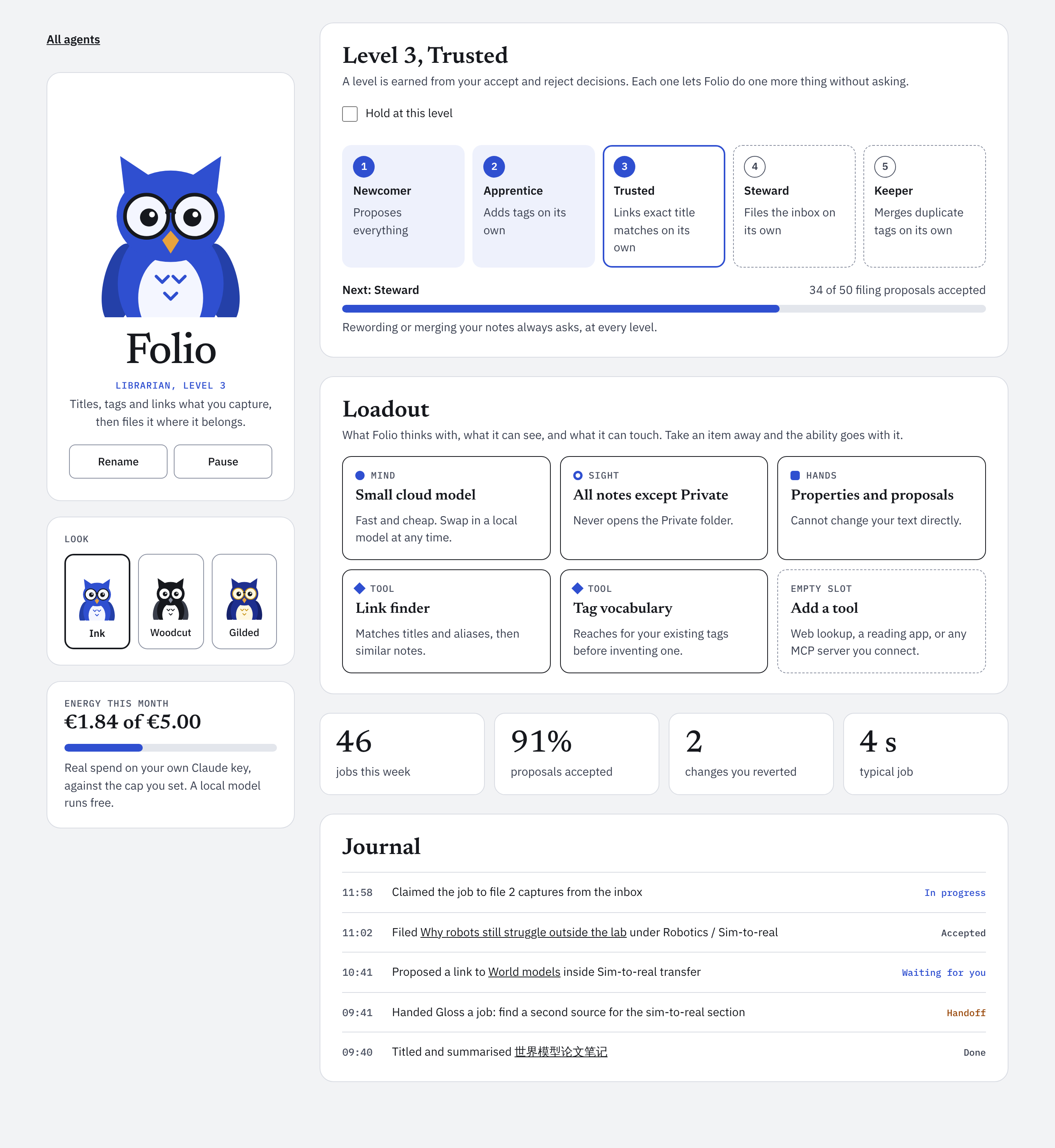
Design for one agent's page: Folio, the librarian.
Each agent, an open book
Every agent has a page of its own, so you always know what it may do, what it has done, and what it costs.
- Trust you can seeComing
Five levels, earned from your accept and reject decisions. Each lets the agent do one more thing without asking, and you can hold it at any level. Changing your words always asks.
- A loadout you chooseComing
Which model it thinks with, which notes it can see, what it may touch and which tools it carries. Take an item away and the ability goes with it. Private notes stay out of sight.
- A cap on what it spendsComing
What it has spent this month on your own key, against the limit you set. A local model runs free.
- A journal of its workComing
Every job it took, every note it filed, every proposal still waiting for you, with the time and the outcome.

Every day
A pleasure to write in for hours
Writing that never waits Now
Built so each key shows within a frame, even in long notes. Saving never moves your place, and one Cmd-Z undoes anything Pompom did.
Files and contents beside you Now
Your folders in one column, with drag to move and undo, and the note's outline in the other.
Writing by keyboard Now
Move by block, jump to any heading or link in two keys, and dim the rest to focus on one paragraph.
Import from Obsidian or Notion Now
Pompom copies your vault or export in. Links are rewritten, private notes stay private, and the originals are left exactly as they are.
English and Chinese Now
Search, links and topics understand both from the start, including notes that switch mid-sentence.
Tasks and reminders Now
Write a task with a date in any note. Pompom gathers them on Today and reminds you on time.

Yours, on your computer
Nothing leaves without you
Plain files
Ordinary Markdown in a folder you choose, with history in git. Open them with anything, forever.
On this computer
Pompom runs on your machine and is reached only from it. No account, no cloud copy, no tracking of any kind.
Private stays private
Mark a folder or a tag private, and its words are never sent to any model, notification or outside service.